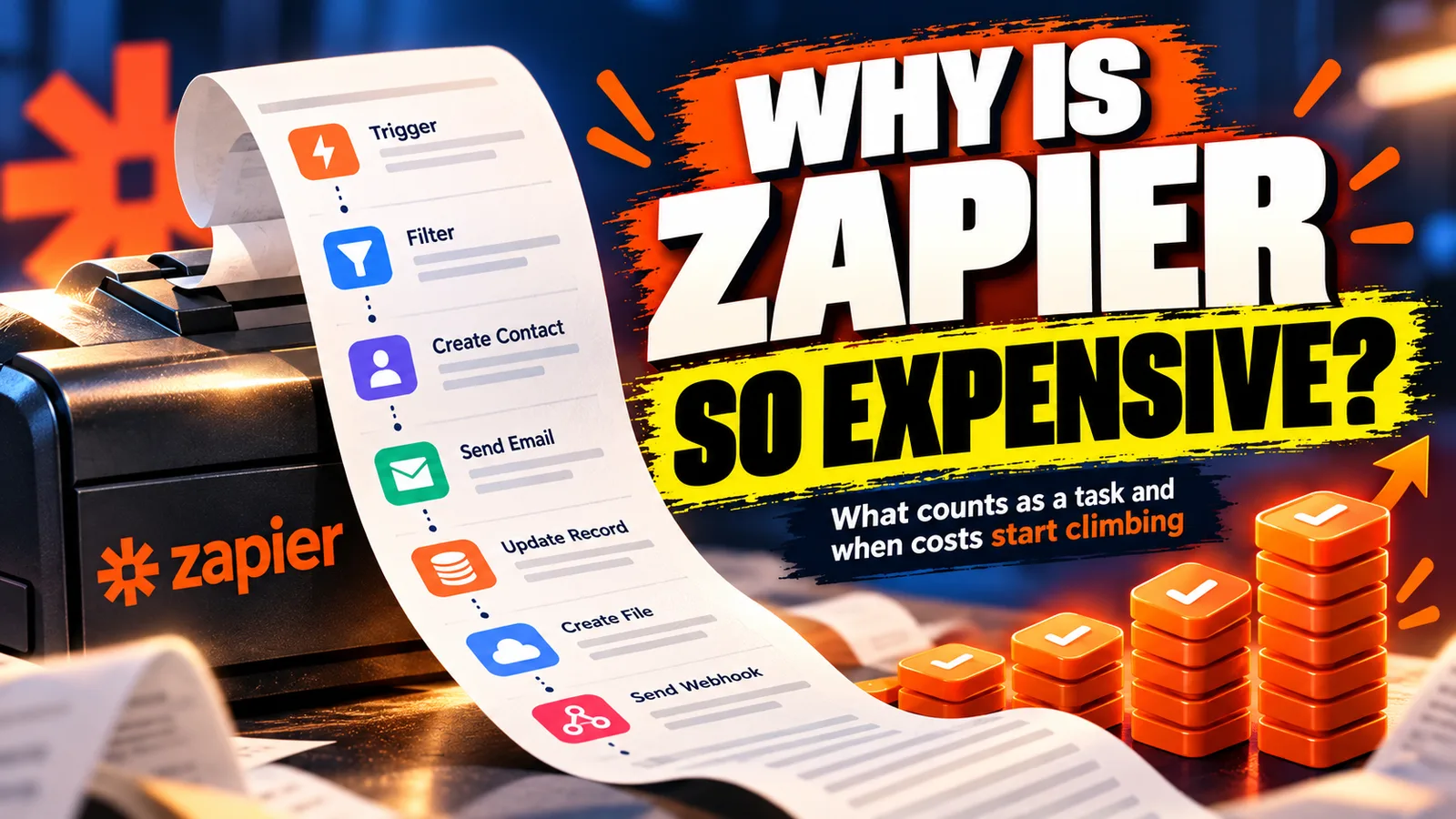
Zapier bills you for the thing you are trying to increase.
What Zapier actually costs once you’re past the free plan: how per-task pricing works, why the bill grows faster than your business, and cheaper ways to run the same workflows.
Founder, Cursive Media
- Read time
- 11 min read
- Updated
TL;DR
- Zapier charges one task for each action step that runs successfully. Triggers, Filters, Paths, Formatter and Delay steps are free.
- Your bill is runs times billable actions, so it climbs with every lead and booking, the things you are trying to get more of.
- Keep low-volume and experimental Zaps on Zapier. Move high-volume, business-critical work to a native integration, your platform, or a small custom job.
Zapier deserves real credit. It taught a generation of business owners that software can talk to software without a developer in the room, and for connecting two tools in ten minutes it’s still hard to beat.
But there’s a pattern we see constantly in automation audits: a business starts with a free Zapier account, and two years later it’s paying more for Zapier than for its CRM, and nobody can say exactly what all those zaps do. That’s the pricing model working as designed.
How much does Zapier actually cost?
Zapier prices by tasks per month. On Zapier’s pricing page as of October 11, 2026, the Professional plan starts at $19.99 a month billed annually ($29.99 month to month) for 750 tasks. More tasks means a higher tier: 2,000 tasks is $49 a month, 5,000 is $89, and 10,000 is $129, all at annual billing. So the plan price is the easy part. The real question is how many tasks your Zaps burn.
Which Zapier steps actually count as tasks?
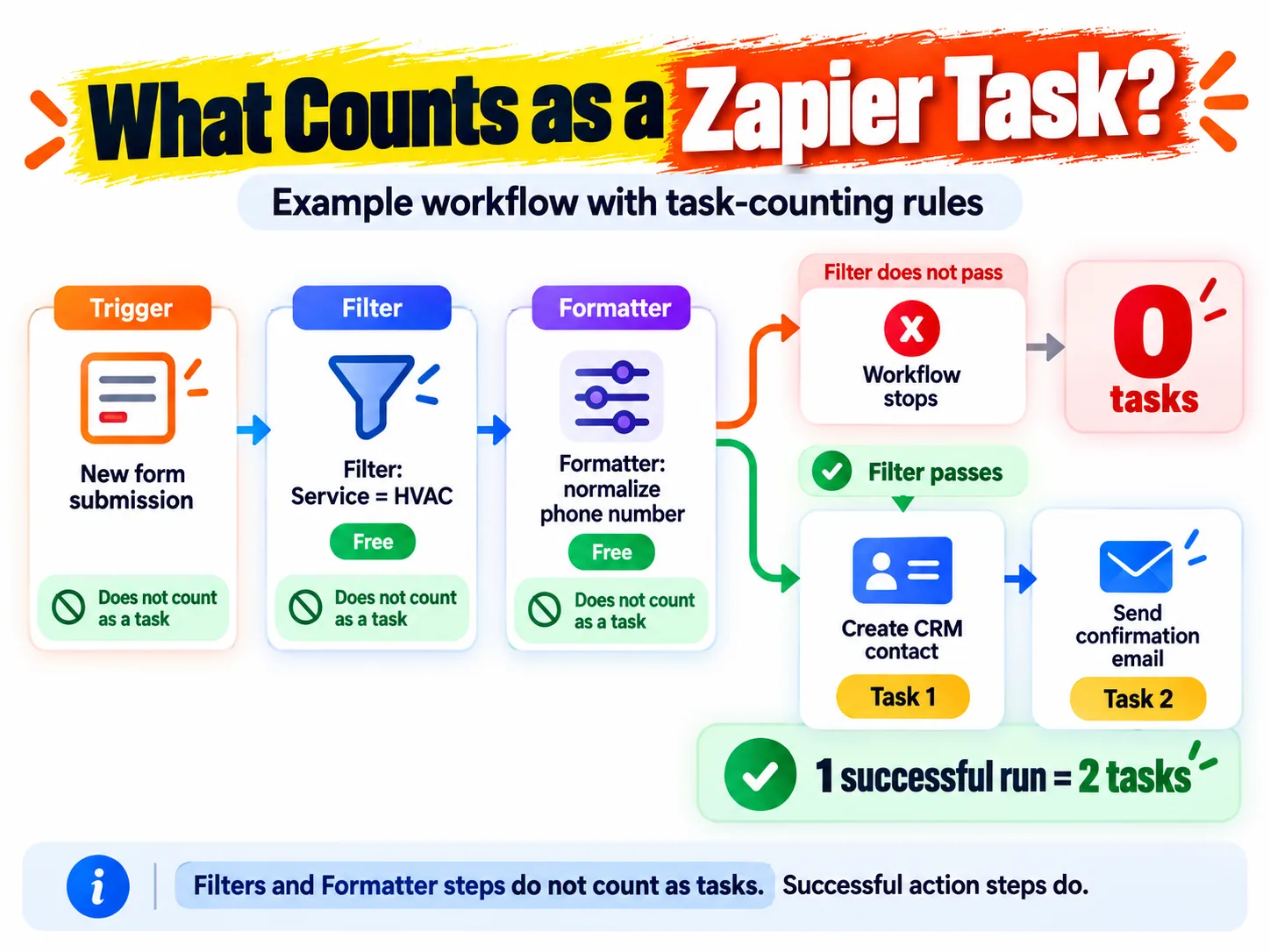
Zapier’s own definition is short: “A task is any successful action that runs in Zapier,” per its help article on how task usage is measured. The trigger that starts a Zap never costs a task. Neither do Filter and Paths steps, or Zapier’s built-in utilities like Formatter, Delay, Looping, Digest and Storage. A step that fails or halts costs nothing, and neither does a step that never ran because a filter stopped the Zap first. What you pay for is each action that reaches into another app and succeeds: create the contact, send the text, add the row. A search step counts too, but only when it’s set to keep going if it finds nothing.
Here’s a typical lead Zap. A form submission triggers it, a filter lets through only the service you want (say, HVAC requests), and a Formatter step cleans up the phone number. All three are free. Then it creates the contact in your CRM and sends a confirmation email. That’s two tasks per lead. At 500 leads a month you need 1,000 tasks, which is already past the 750 in the entry Professional plan. Any request the filter stopped cost you nothing.
Now notice what each of those runs corresponds to in your world: a new lead, a booked appointment, a paid invoice, a review request. The things you’re trying to get more of.
Per-task pricing is a tax on your own growth. The better your month, the bigger the bill.
Is Zapier really free?
The free plan is real, and worth being precise about. As of Zapier’s published pricing in October 2026, it includes 100 tasks a month across unlimited Zaps, but only two-step Zaps (one trigger, one action), checked on a 15-minute polling cycle, with premium apps and webhooks reserved for paid plans. For testing an idea this afternoon, that’s genuinely plenty.
Notice how precisely those limits are shaped to expire. A hundred tasks is roughly three business events a day. Two steps means the first time you want a filter between your form and your CRM, you’re shopping. And 15-minute polling means a "new lead" can sit untouched for a quarter hour. That is exactly the window where speed-to-lead lives or dies. The next stop is Professional, and the meter starts running.
Why Zapier gets expensive
The bill doesn’t jump so much as creep, and each step feels reasonable in isolation.
- You outgrow the free tier the first month anything real runs through it.
- Zaps multiply. Every new tool, campaign, and "quick fix" adds one. Five become forty, and each nibbles the same task pool.
- Actions multiply. The filters and formatters you add are free, but every new action (a second CRM update, a text to the customer, a row in a spreadsheet) adds a task to every single run.
- Volume grows because your business grows, which is the one variable you never want to optimize downward.
- You hit a plan ceiling and the next tier is a step change, not an increment.
None of those decisions was wrong. The sum is a bill that scales with your success while the value per task stays flat. Moving a lead from a form into a CRM is worth the same to you at 200 leads a month as it was at 20. It just uses ten times the tasks.
The math is one multiplication: runs a month times billable actions per run. Here it is for 500 events, assuming every run succeeds and every action completes.
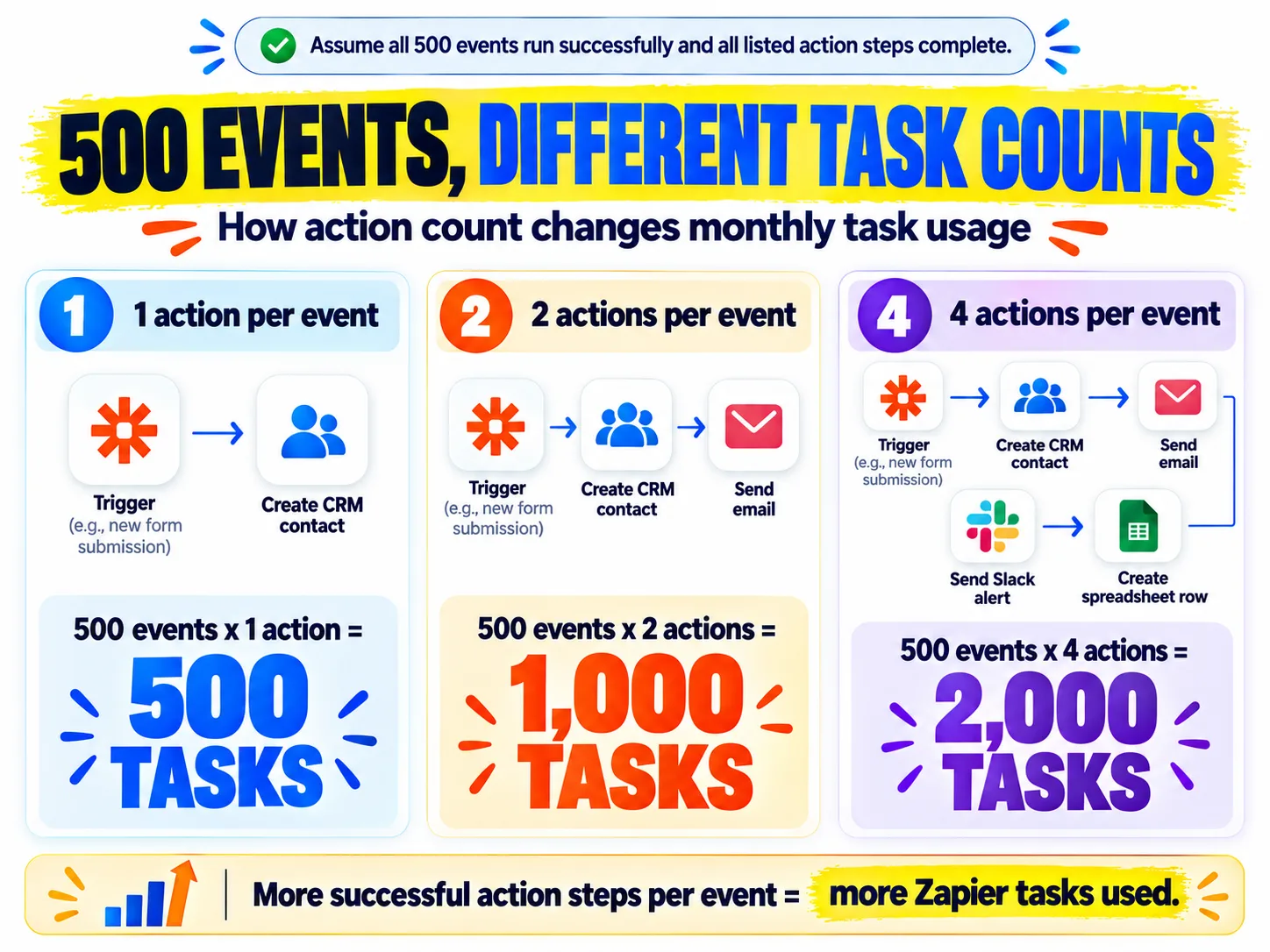
One action fits inside the entry plan’s 750 tasks at $19.99 a month. Four actions is 2,000 tasks, the $49 tier. Your business did the same amount of work in all three columns. And that’s a single Zap; the plan meters every Zap in the account against the same pool.
The costs beside the invoice
The subscription is the visible cost. The structural ones matter more. Zaps fail quietly. A changed field name or an expired connection stops a workflow, and unless someone reads the failure emails, you find out when a customer complains. Polling intervals mean "instant" follow-up can lag by minutes, which is an eternity in speed-to-lead terms. And your business logic ends up living in forty places nobody documented, which is how zap sprawl becomes an operational risk, not just a line item.
Is there a cheaper alternative to Zapier?
Escaping the tax is mostly about matching each workflow to the right layer. In rough order of preference:
- Native integrations first. If your CRM already connects to your form tool or calendar directly, that connection is free, faster, and maintained by someone else. Check before you build the zap. The button is often already there.
- Platform-level workflows. If the workflow is lead follow-up, appointments, pipelines, or reviews, an all-in-one platform like GoHighLevel runs unlimited workflows inside the subscription you already pay. Standard workflow steps aren’t metered. You still pay per use for the texts and emails themselves, and HighLevel charges $0.01 per execution for its premium workflow features.
- Make, for genuinely cross-app plumbing at volume. It meters differently, so run your own numbers; we compare the two in Zapier vs Make.
- A small custom job for your highest-volume core flows. A webhook and fifty lines of code have no Zapier per-task meter and no vendor ceiling, and can be built to alert loudly on failure. You still pay for hosting, monitoring and someone to maintain it, but that cost doesn’t climb with every lead. That’s the kind of thin custom layer we describe in build vs. buy.
When Zapier is still the right answer
This isn’t a demolition order. Zapier remains excellent at the edges: low-volume workflows and prototypes you want live this afternoon. It also still has the largest app catalog anywhere, which makes it the obvious pick for long-tail apps nothing else connects to. The failure mode isn’t using Zapier; it’s running your business-critical, high-volume workflows through a metered middleman forever.
The decision rule we use: high-volume and business-critical belongs on a platform or in code; low-volume and experimental can stay on the meter. Volume times criticality tells you where every workflow lives.
How to check your Zapier task usage
Open Zap history and switch to the Task usage tab. Zapier’s help article on Zap history says it shows the current billing period by default and lists up to 100 Zaps sorted by tasks used, highest first. Your top ten are right there. Ask three questions about each: does a native integration now exist, does this belong inside our platform, and would this hurt if it failed silently for a week?
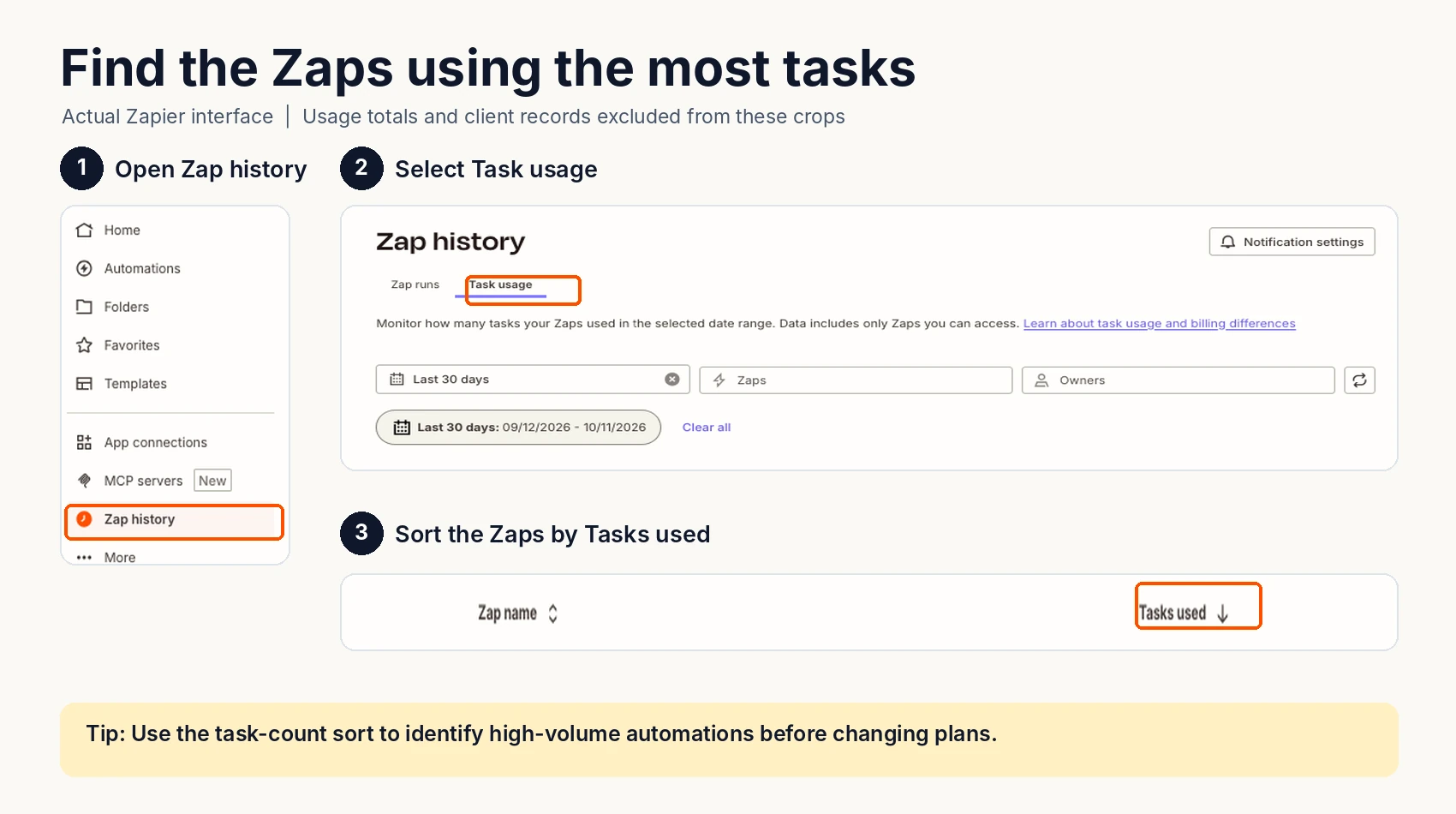
A yes to the first or second is a Zap you can retire. A yes to the third is a Zap that needs failure alerts whether it moves or not. If you’d rather have someone who does this weekly run the audit, that’s part of our automation work, including rebuilding Zapier setups into systems that cost less and fail louder.
Founder, Cursive Media