The best CRM for small business is the one someone actually runs.
Most small-business CRMs fail from non-use, not missing features. A picking framework built on who will actually run the thing, plus a short, honest shortlist by situation.
Founder, Cursive Media
- Read time
- 12 min read
- Updated
TL;DR
- Pick a CRM by who will run it: an owner on the phone needs one that feeds itself, a sales team can run a pipeline tool, and nobody means don’t buy yet.
- For local service businesses we start with GoHighLevel; HubSpot, Pipedrive and field-service tools fit other situations, labeled by how we know.
- Whatever you pick, test it in week one with one real lead source, one pipeline and follow-ups that fire from stage changes.
Every "best CRM for small business" article ranks fifteen tools by feature count, and none of them mention the thing that actually decides the outcome: most small-business CRMs die of neglect. Bought after a good demo, contacts imported, and eight weeks later the real pipeline is back in someone’s text messages. The features never got the chance to matter.
So this is not a fifteen-tool review. Honestly, we couldn’t write one. We implement and run GoHighLevel for clients every week, and beyond a couple of platforms we know from real use, everything else would be us paraphrasing other people’s reviews. What we can give you is the thing the listicles can’t: the picking framework that predicts whether any CRM survives contact with your business, and a short list of where to start looking, labeled honestly: what we run versus what we know by reputation.
The only question that predicts success
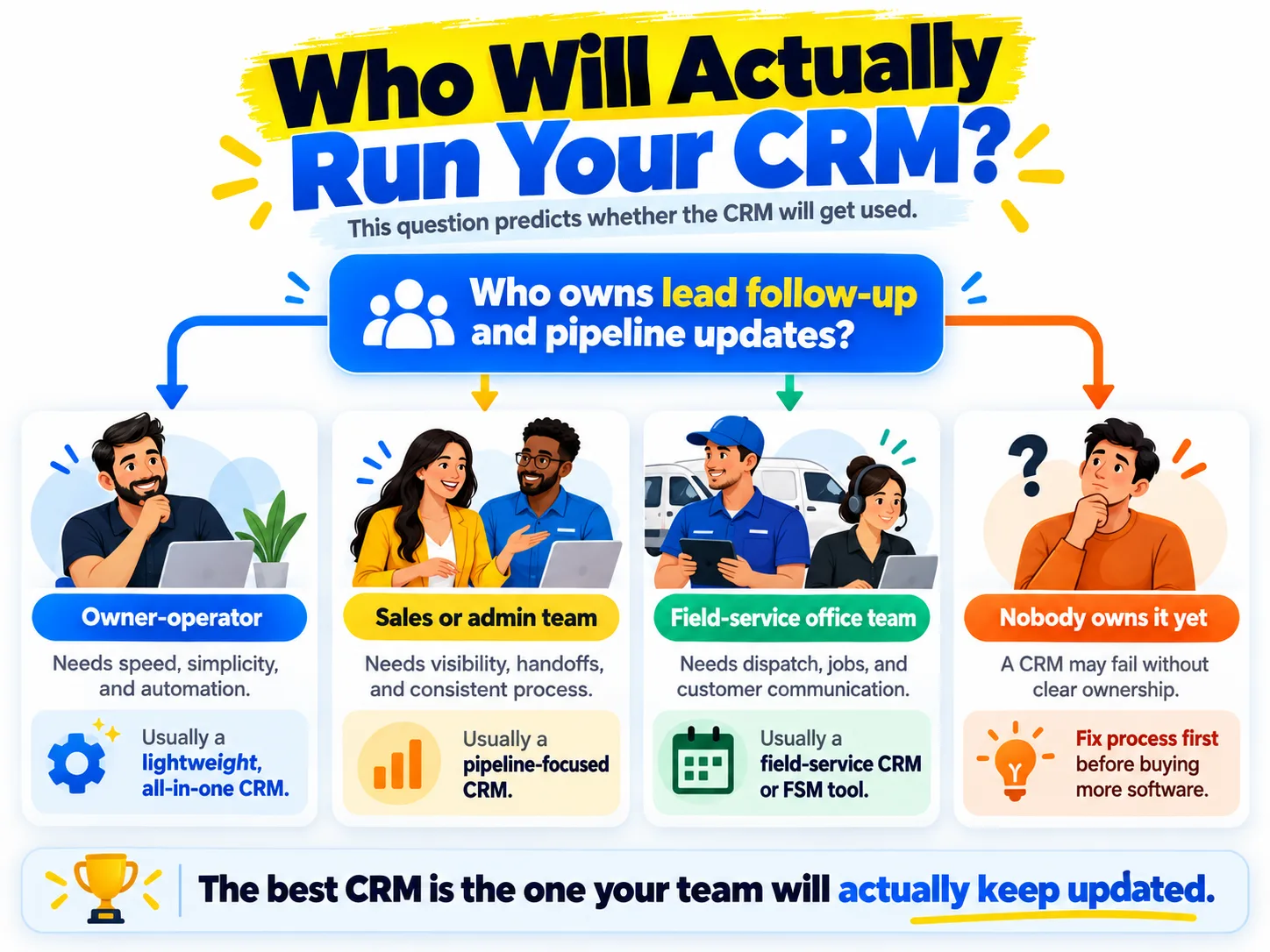
Who is going to run this? Not "use" it. Run it. Every CRM needs one person who keeps the pipeline honest, and the right tool depends entirely on who that person is.
If it’s the owner of a service business, between jobs, on a phone: the CRM must feed itself. Every form fill, call, text, and booking has to land in it automatically, because nobody is typing notes into a laptop from a crawlspace. If it’s an office team with someone who owns sales: you can afford a tool that expects daily human attention, and pipeline clarity beats automation breadth. And if the honest answer is "nobody": stop shopping. A CRM without an operator is a subscription to a guilt folder. Fix the ownership question first, or stay on the shared inbox until you can.
Five questions to answer before you shop
Answer these on paper before you book a single demo. Each one rules tools in or out faster than any feature grid.
- Do most leads arrive by phone call or text? Then the CRM needs calling and texting built in, or every conversation becomes manual data entry.
- Can you name the one person who keeps the pipeline current? If not, stop here and settle that first.
- Do you send people to job sites? Then scheduling and dispatch outrank pipeline features, and field-service tools go to the top of the list.
- Are there more leads this month than you can track in your head and one inbox? If not, you may not need a CRM yet.
- When a form stops syncing, who notices? Whoever that is owns the weekly check further down, whichever tool you pick.
The shortlist, by situation
Labeled the way we’d tell you across a table. One of these we deploy constantly; the others are the credible names for situations that aren’t ours, and we say so.
| Your situation | Start with, and how we know |
|---|---|
| Local service | GoHighLevel. The one we implement weekly: CRM, phone and SMS, calendar and review asks in one subscription ($97 or $297 a month on HighLevel’s pricing page), so the CRM feeds itself. Affiliate link below, disclosed. |
| B2B sales | HubSpot. By reputation and client reports, not our daily use. The CRM itself is free with no expiration date; paid tiers are on HubSpot’s pricing page. Watch the tier jumps. |
| Pipeline sales | Pipedrive. Research-labeled: the recurring recommendation for pure pipeline discipline without suite bloat. |
| Field service | Jobber or another field-service platform, for trades at scale. Research-labeled: scheduling, quoting and dispatch matter more than CRM purity, so vertical tools fit better than generic ones. |
| Tiny team | Nothing yet. Our actual advice for two people and a dozen customers: a shared inbox and a calendar are a fine CRM at this size. Buy software when the leads outgrow them. |
Why GHL is our default, and who it’s wrong for
For the local service businesses we serve, GoHighLevel keeps winning for one structural reason: the operator problem from earlier disappears when the phone system, the booking calendar, and the CRM are the same product. A missed call texts back, the reply threads into the contact record, the booking fires the reminders. No one "updates the CRM" because the CRM updated itself. That’s the non-use antidote, and it’s why the pricing usually beats the stitched-together stack it replaces.
And the honest other half: it’s the wrong tool for plenty of businesses. E-commerce and product companies belong elsewhere; teams already happy in HubSpot or Pipedrive shouldn’t migrate for marginal gains; and GHL has real rough edges we’ve documented in is GoHighLevel legit and the alternatives worth considering. A badly configured platform loses to a well-run spreadsheet every time, whatever the logo says.
Whatever you pick, rig it against non-use
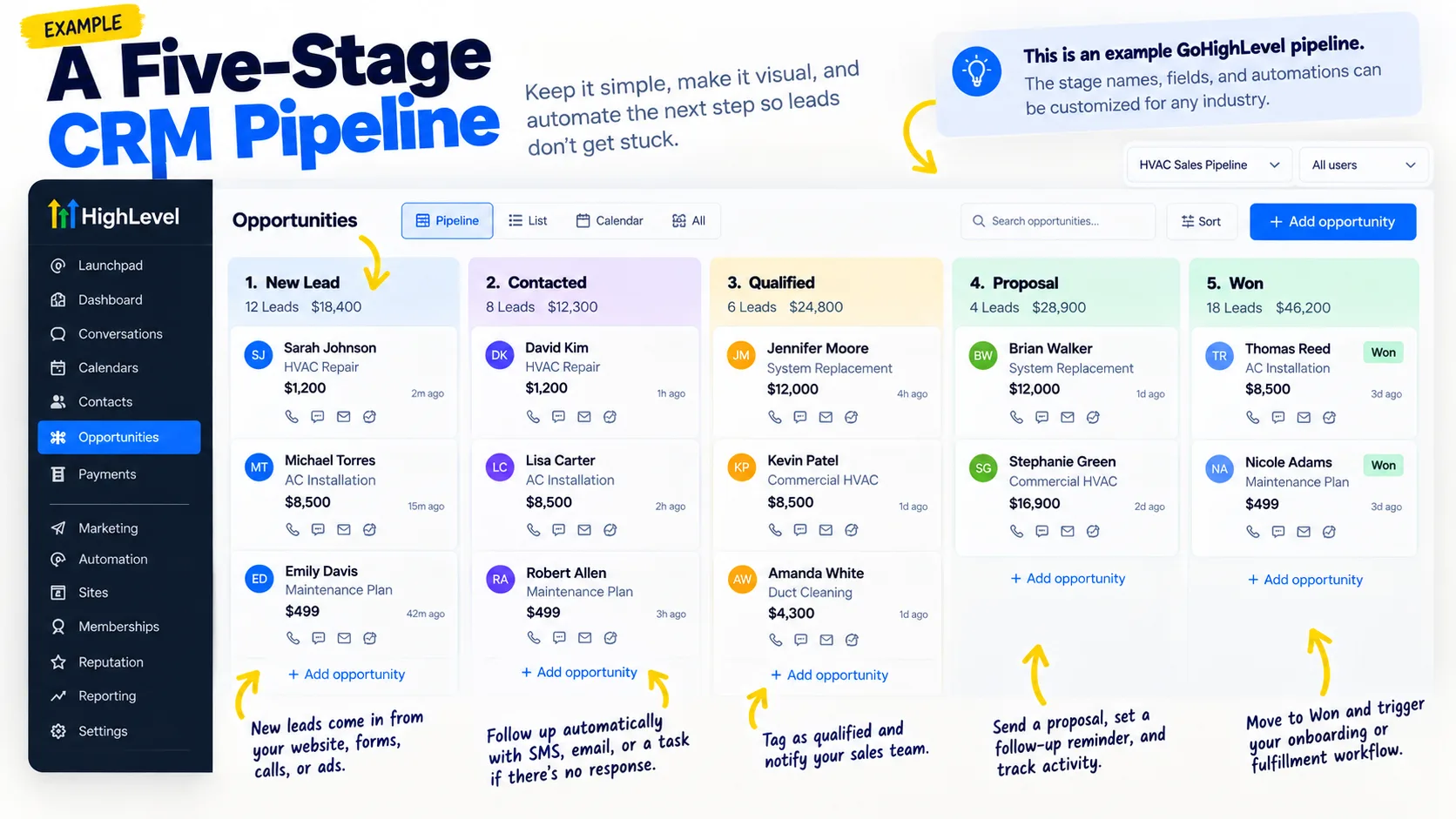
Three moves, doable in week one on any of the tools above. Automate the intake so every lead source lands in the CRM without a human copying anything. Run exactly one pipeline with five or six stages. The twelve-stage masterpiece is where deals go to hide. And wire the follow-up to fire from stage changes, so the system nags itself instead of relying on the owner’s memory. That wiring sequence is the spine of our 30-day automation roadmap.
"Feeds itself" doesn’t mean "runs itself." Forms get edited, a text arrives from a number the CRM has never seen and creates a duplicate, a connection expires. None of that announces itself. The fix is a short weekly look at four lists: leads with no owner, leads nobody has contacted, deals that haven’t moved, and anything that failed to sync. If your CRM can save filtered views, save all four and the check takes minutes.
The first-week test
Before you roll a CRM out to the whole team or import years of contacts, make it pass this in the first week:
- Connect one real lead source, like your website form, and send yourself a test lead.
- Send the same test lead again and check it lands on the existing contact instead of creating a duplicate.
- Check it was assigned to the right owner without anyone touching it.
- Move it one stage and confirm the follow-up message fired.
- Mark a deal won and find it again in your weekly check views.
If any step needs a workaround in week one, it will need one every week after. That’s the cheapest moment to find out.
Disclosure: links to GoHighLevel in this article are affiliate links, so we earn a commission if you sign up through them. It costs you nothing extra, and it didn’t write the "who it’s wrong for" section.
If the answer turns out to be GoHighLevel, running it properly is what we do. The platform is the smaller half, and the system built on top of it is the rest. If you’re staring at a dead CRM right now, or about to buy your second one, the problem is either the tool or the operator question, and only one of those is fixed by shopping.
Founder, Cursive Media