Request access to a Google Business Profile you own.
How to request access to a Google Business Profile an old agency or ex-employee still controls, why a denial is worse than silence, and the order to do it in.
Founder, Cursive Media
- Read time
- 7 min read
- Updated
The listing has your name on it, your address, your reviews, and your photos. You cannot change the hours. You cannot answer the review that went up last night. Somewhere behind it is a Google account that belongs to a marketing company you stopped paying in 2023, or a former office manager, or a web guy whose last name you are no longer certain of.
Google has a process for this. It is five steps, and the sequence you run it in matters more than any of the individual steps.
Work out who holds it before you click anything
The request goes to whatever Google account is attached to the profile. That account is usually one of three things, and the right move differs for each.
Sometimes it is a live vendor who still reads their email, an agency you parted with on decent terms or a web host you are still paying. Those get resolved with a phone call and the formal process never has to start. Nearly as easy is the person who has left: the office manager who set it up on a personal Gmail, the college kid who built the first website. They are usually reachable, usually willing, and frequently unaware they are still holding anything at all.
Then there is the dead address. The agency dissolved, the domain lapsed, the inbox nobody has opened since 2021. Nothing you send there will ever be read by a human, which sounds like the worst case and turns out to be the most predictable one.
Spend twenty minutes working out which one you are dealing with before you touch the form. Old invoices, the contract, the person who signed off on the website, the email the review notifications used to go to. Our free profile audit will at least settle whether the listing is claimed at all, which decides whether this is a request for access or the much easier job of claiming an orphan. This is the step everyone skips, and it decides everything that follows.
Why a denial is worse than silence
This is the part the standard write-up leaves out, and it comes straight out of Google's documented outcomes. When you request access, the current owner is emailed and has three days to respond. Three things can happen.
They approve it, and you have the profile. They deny it, and you get a rejection email; you can still suggest an edit to the profile and you can try to appeal the decision, but you are now in a slower process with a human on the other side who has already said no once. Or they do nothing, and after three days you may get the option to claim the profile yourself, subject to verification. Google is careful to say that option is not always available.
Look at the shape of that. Silence is a better outcome for you than a refusal.
Which means firing off a request as your opening move is a genuine mistake when the profile is held by someone with a reason to say no, or by anyone who might reflexively deny an unexpected email about a client account. A disgruntled ex-vendor with a live inbox is exactly the person who will click deny, and you have spent your cheapest option to find that out.
So: if there is a human who might cooperate, ask them off-platform first, and agree what is about to arrive in their inbox. If the address is dead, submit the request immediately, because the three days of silence you want are already guaranteed and the clock may as well start now.
Running the request
The whole thing is three screens. Before you start, sign in to the Google account the business will still control in five years. The account you request from is the account that ends up holding the listing, and doing this from a personal Gmail recreates the exact problem you are fixing.
- 1. Go to business.google.com/add while signed in to that account.
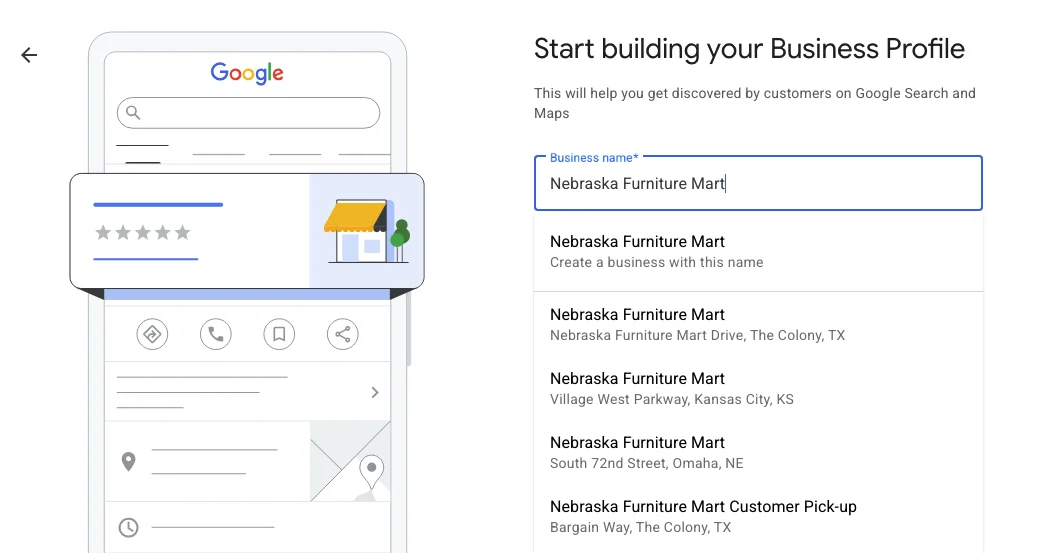
- 2. Type the business name into the "Business name" box. A list of matching listings drops down under it.
- 3. Pick your listing from the list, the one with your address under it. Do not pick "Create a business with this name," which starts a duplicate.
- 4. Google shows "Someone else may manage this Business Profile" and a masked version of the email that holds it. Click Request Access.
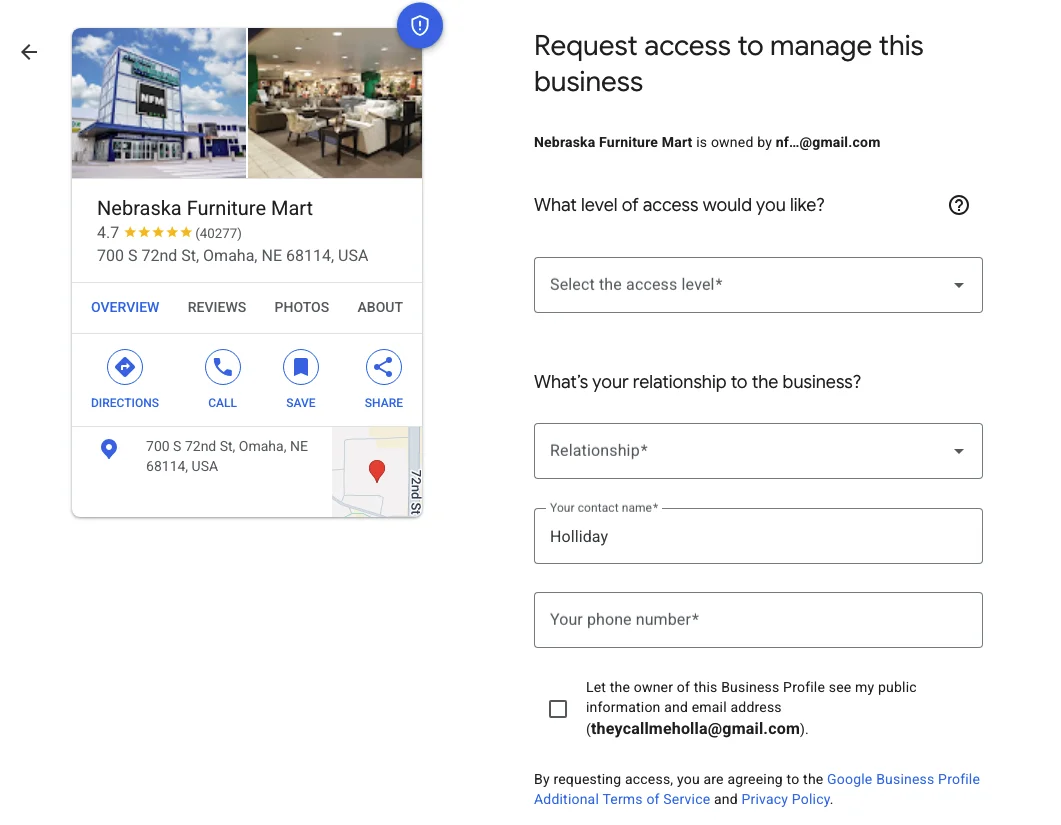
- 5. On the form, choose the access level (ask for Owner), your relationship to the business, your name, and your phone number. Tick the box that lets the current owner see your email, then click Submit.
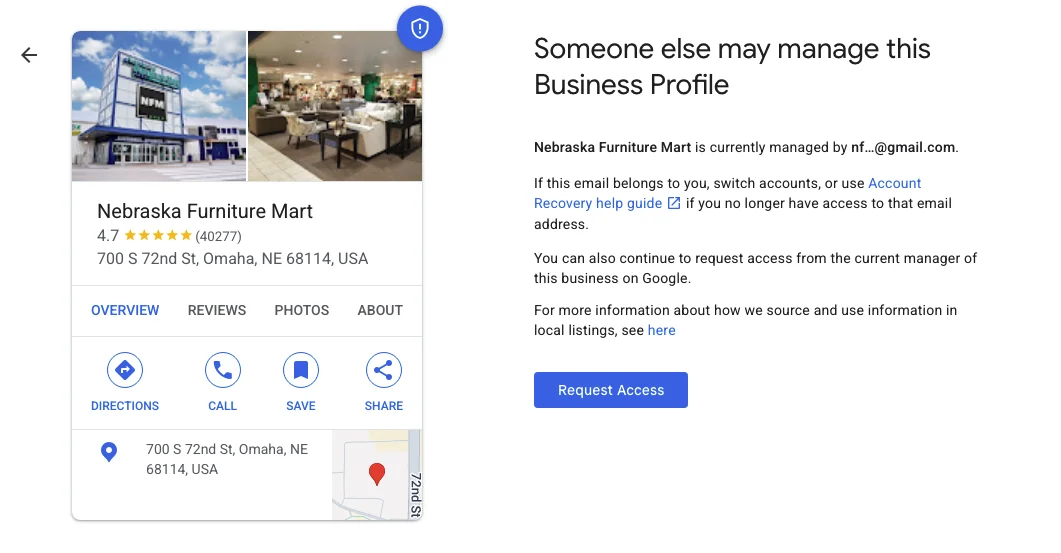
One warning on step 4. If Google skips the "someone else may manage" screen and goes straight to "Select a way to get verified," nobody holds the listing at all. That is a different job, and an easier one: you are claiming an unclaimed profile, and the verification guide covers it.
Then wait the three days out. Do not submit a second request, do not create a parallel profile for the same business while this is in flight, and do not let anyone talk you into a "listing service" that promises to bypass the queue. The one thing that genuinely helps during the wait is having your verification evidence ready, because if the claim path opens you will be asked to verify, and the verification methods have their own quirks. Expect a settling-in period after that too: Google restricts what new owners can do for a while, so if a setting will not save on day one, that is the restriction rather than a fault.
Patience is the whole skill here.
When there is no address to request against
Service-area businesses hit a wall here, because the request flow starts by finding the business at an address and a plumber who works out of a truck has hidden theirs. Google's documented route for this case is to contact support directly and specify "Transfer ownership of listing" as the issue. Use that exact phrasing; it maps to their process rather than to yours.
Have the same evidence pack ready that you would need for any ownership question: registration, license, tax document, a utility bill in the business name. If the profile has also been suspended at some point, sort the ownership first. Appealing a moderation decision on a profile you cannot administer is arguing on behalf of an account you do not hold.
Some ownership problems are duplicate problems
Before you fight for control of a listing, check whether it is the listing that matters. Businesses that have moved, rebranded, or been through an agency handover often have two profiles, and the one you are locked out of may be the one Google has already deprioritized.
Google's route for genuine duplicates is to report a suggestion on Maps so the profiles can be merged, and to appeal if a profile has been marked duplicate in error. Merging usually beats a custody battle. The reviews and the history you actually want tend to be attached to whichever profile customers have been finding, not to whichever one you remember creating, and that is a question you can settle in Maps in about a minute by searching the business the way a customer would and seeing which listing Google puts in front of you.
The version where this never happens again
The root cause is almost never malice. It is that whoever built the thing first claimed it under their own Google account, and nobody wrote down that the account was load-bearing.
The business should hold the primary owner role, on an account tied to the business rather than to a person who might leave. Every vendor after that gets manager access, which lets them do the work and lets you revoke it in ten seconds when the relationship ends. That includes us. An agency that insists on being the owner of your profile is holding a hostage, and it is the same instinct as the white-label operators who keep the accounts in their own name.
Audit it this week. Open the profile, look at who has access, remove the people who left. Then do the same for your domain registrar and your ad accounts, because they fail in exactly this way and tend to fail on the same afternoon, when the person who set everything up under one personal login finally changes jobs.
If you are locked out right now and cannot work out who holds the keys, book a strategy call. Untangling this is routine onboarding work for us, and it is the first thing our reputation practice fixes, because nothing else on the profile is worth doing until you can actually save a change.
Founder, Cursive Media