Zapier MCP, explained: your AI can now run 9,000 apps. Should it?
Zapier MCP lets AI assistants like Claude and ChatGPT trigger real actions across 9,000+ apps. What it is, what each call actually costs, and when it beats building a normal Zap.
Founder, Cursive Media
- Read time
- 11 min read
- Updated
TL;DR
- Zapier MCP lets an AI assistant run actions in your apps through your Zapier account. It is included in every Zapier plan.
- Each successful tool call uses two tasks from the same pool as your Zaps. Drafting in the chat costs nothing; failed calls cost nothing.
- Start in managed mode with read-only actions, approve every send, and move anything regular into a normal Zap.
Zapier MCP connects AI assistants (Claude, ChatGPT, Cursor, most of the major ones) to the 9,000+ apps in Zapier’s catalog, so instead of just drafting the follow-up email, your AI can send it, log the contact in the CRM, and book the calendar slot. Zapier’s own tagline is the honest summary: your AI can talk; MCP makes it act.
Up front, in keeping with how we write about AI: we haven’t deployed Zapier MCP for a client yet. What follows is an explainer from Zapier’s published documentation plus our lens as people who rebuild Zapier stacks for a living, including the cost math that the launch coverage mostly skipped.
What MCP actually is
MCP, or Model Context Protocol, is an open standard for handing AI assistants tools they can call. Anthropic open-sourced it; the industry adopted it. Zapier’s implementation is straightforwardly clever: rather than building one-off plugins per app, it exposes Zapier’s action catalog as MCP tools. You connect your AI client to your Zapier account once, which takes a few minutes, and the assistant can run actions from a plain-language request. Every call goes through your existing app connections and shows up in the History tab at mcp.zapier.com.
The split worth holding onto: the AI does the thinking, and Zapier does the acting. Reading your request, choosing tools, and writing a draft all happen in the chat. Nothing touches your apps until a tool call runs.
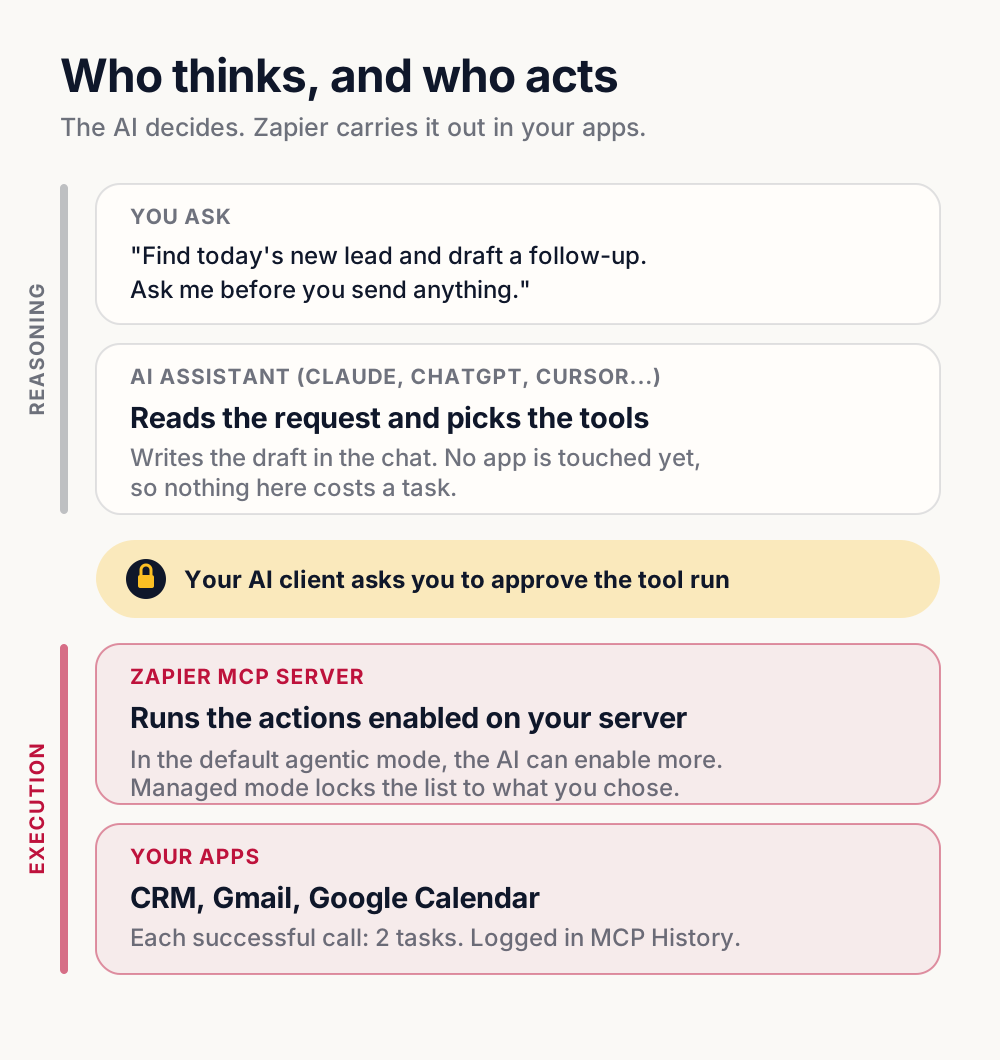
The permission model is the part to take seriously, and it changed since launch. Per Zapier’s quickstart, a new server automatically enables actions for every app already connected to your Zapier account, and if you ask for something that isn’t enabled, the agent finds and enables it as part of the same request. That default is called agentic mode. It’s convenient. It’s also the opposite of the narrowest grant you can give an assistant that can send email as you and write to your CRM.
The cost math nobody leads with
Zapier MCP is included in every Zapier plan. There’s no separate product to buy. The catch is the meter: per Zapier’s usage and billing docs, each successful tool call consumes two tasks, from the same pool your Zaps drain. Failed calls cost nothing, and neither does asking the AI what tools it has. Batches count per item: "send emails to 3 people" is three calls, six tasks. We’ve written at length about how per-task pricing taxes your growth; MCP extends that meter to conversations.
Here’s one ordinary request, worked through. It’s an illustrative example, not a client log.
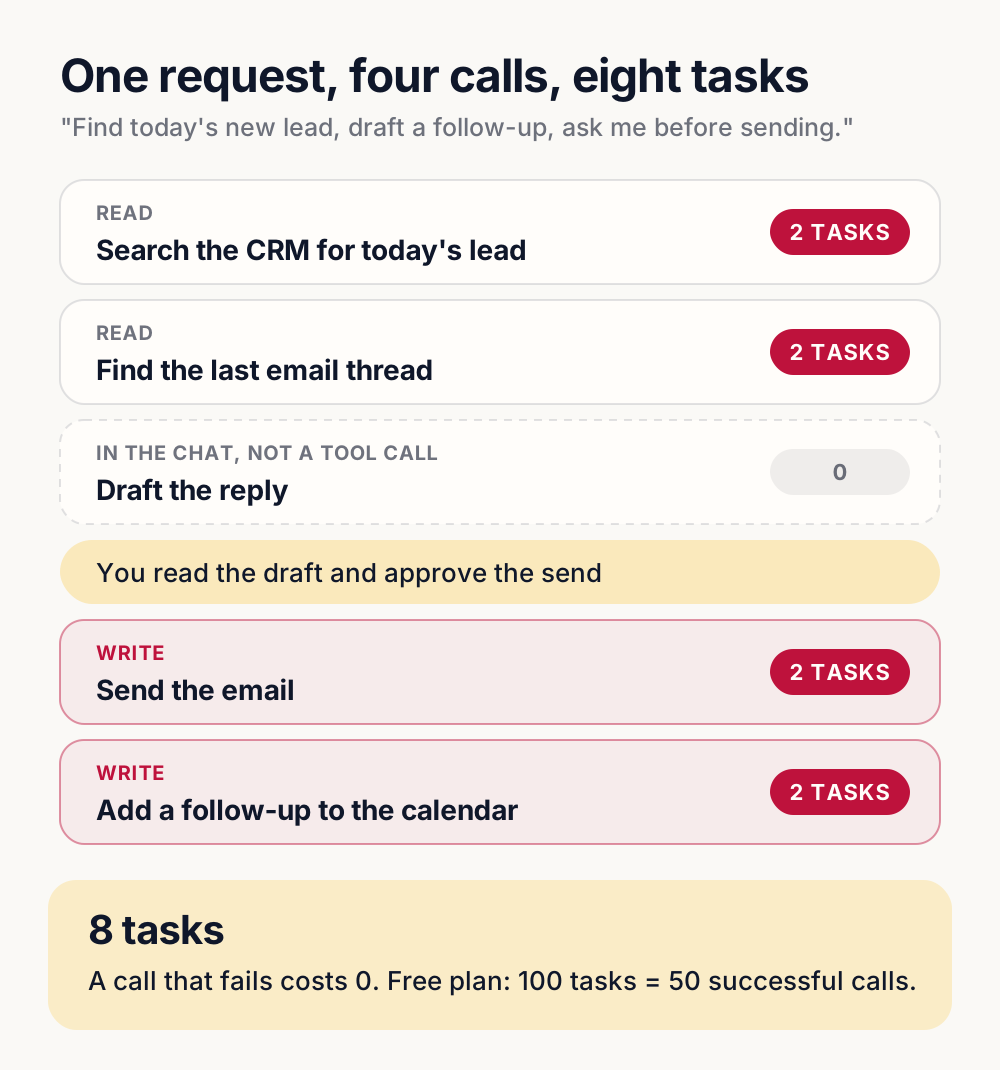
Four successful calls, eight tasks, for one follow-up. On the free plan’s 100 tasks a month, that’s about a dozen of those requests, and an enthusiastic assistant burns the month in a weekend. That doesn’t make it a bad deal. It makes it a metered deal, and metered deals reward knowing your volume before you commit workflows to them.
Where it genuinely shines, and where a Zap still wins
MCP’s sweet spot is the irregular, judgment-shaped task: "find the thread with the roofing quote, draft a reply, and put a follow-up on my calendar." That’s not a workflow. It’s a one-off with three tools in it, exactly what an assistant with hands is for. The moment a task becomes regular and predictable, with every new lead getting a text and every invoice getting logged, you want a boring, deterministic Zap or a platform workflow, not an AI improvising the steps each time. Deterministic automation is cheaper per run, doesn’t hallucinate, and breaks the same way every time it breaks. That makes it easier to monitor, though it still needs someone watching: a scheduled Zap can fail quietly too.
What about the rest of "Zapier AI"?
MCP is one piece of Zapier’s broader AI push, alongside AI steps inside Zaps (summarize this, extract that) and Zapier Agents. They don’t all meter the same way. Per Zapier’s task-usage article, an AI by Zapier step uses tasks at a rate that depends on the model tier you pick, while Agents run on a separate activity quota instead of tasks. The lens is the same either way: AI inside a workflow step is often genuinely useful; AI as the workflow adds a meter and a maybe to something that used to be cheap and certain.
Give AI the judgment calls. Give the meter as few of them as possible.
How to try Zapier MCP safely
If you want to test it this week, the order matters more than the speed. Here’s the setup we’d use, built from Zapier’s documentation:
- Connect your AI client using Zapier’s quickstart. Claude, ChatGPT, Cursor and dozens of others are listed.
- Open your server at mcp.zapier.com, go to Settings, and switch it to managed mode. In managed mode the agent uses only the tools you chose and can’t enable new ones.
- Disable every auto-enabled action except one read action, like finding an email or listing tomorrow’s meetings. Switching modes keeps whatever was already enabled, so this step is not optional.
- Ask something harmless ("What meetings do I have tomorrow?") and check the History tab to see exactly what ran.
- Add write actions one at a time. Zapier’s quickstart suggests approving tool runs for the whole session to save prompts. For anything that sends, posts, or changes a record, approve each run.
Then decide how much each kind of action should be trusted. This is our rule of thumb, not Zapier’s:
| What the AI can do | Examples, and how we’d set it up |
|---|---|
| Read and search | Find a contact, list tomorrow’s meetings. Start here; still 2 tasks per call. |
| Create records | Add a CRM note or a task. Enable once reads behave, and review History weekly. |
| Send or post | Email a customer, text a lead. Approve every run, never for the whole session. |
| Change or delete | Edit an invoice, delete a contact. Leave off; if ever needed, managed mode with locked field values. |
Managed mode can also lock specific field values on a tool, so an assistant that’s allowed to create a CRM record can only ever create it in the pipeline you named. That one feature turns a lot of "maybe" rows into "yes, carefully."
Should you set it up?
If you’re already paying for Zapier and you live in Claude or ChatGPT all day: probably, narrowly scoped. Setup takes minutes, and the one-off-task pattern is real. If you’re volume-sensitive or your needs are regular rather than improvised, the answer is the same one we give about Zapier generally versus the alternatives: match the tool to the shape of the work, and put the high-volume stuff where there’s no meter.
If you’d rather someone map that for you, that’s the AI integration conversation: which workflows belong in deterministic automation, where an AI assistant actually earns its tasks, and what AI is worth wiring into your stack at all. DIY tools are user-friendly, but they don’t sit down and learn your business first. We do.
Founder, Cursive Media